
 by
by 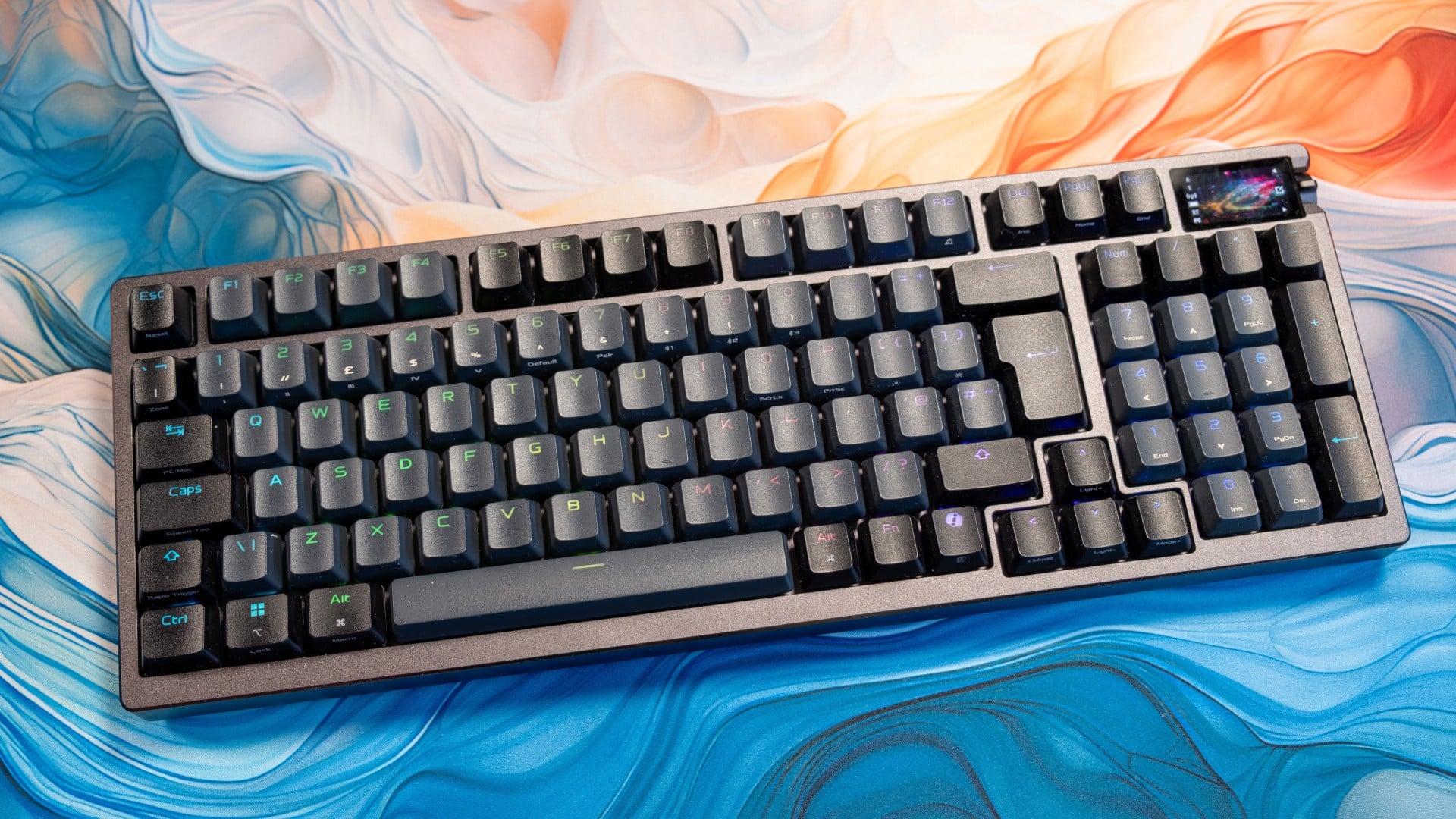
The keyboard I'm using to write these words costs about the same as a mid-range smartphone - a ridiculous £350. The Asus ROG Azoth 96 HE is a top-notch option, no doubt, but is any peripheral worth such a princely sum? Even as a hardened mechanical keyboard degenerate, I'd struggle to recommend plunking down that kind of honk for a keyboard that doesn't fly around the room or at least do your taxes.
Still, as a study of what is possible at the extreme high-end of the mechanical keyboard market, the Azoth 96 HE is still interesting. Like the ROG Harpe Ace 2 mouse I reviewed recently, it shows that Asus has really upped their peripheral game, combining all of the latest must-have features into a product that still feels purposeful, well-designed, even graceful - or at least, as graceful as you could charitably describe a compact 96-key keyboard that weighs around 1.4kg or 3.1lbs.
The first thing I noticed was the tiny (1.5-inch) OLED screen built into the top right of the keyboard. This is normally just a fancier alternative to the trio of LEDs that show Caps Lock and other status effects on regular keyboards, maybe with the ability to show different screens that let you adjust keyboard settings sans software, like the SteelSeries Apex Pro keyboards. The Azoth 96 HE broke my brain when I realised that the screen is a touchscreen - something that I don't think I've seen on a keyboard before.
As well as pushing the nearby knob up or down or in or sideways to change various settings, you can also double-tap the screen to show/hide the status info or flick up or down to change the background animation. Flicking left or right brings up a "keys per second" readout. It's not quite a full-fat DF frame-rate graph, but I'll take it. The status info is also context-sensitive, so if you've set the knob to skip through tracks, you get the appropriate ⏭️⏮️⏯️ indicators at each position - delightful.
The same care and attention has been paid to the mechanical action of each keypress, which is smooth and linear thanks to pre-lubricated Hall Effect switches and stabilisers. You still get a lot more tactile feedback than on a membrane or scissor switch keyboard, but the Azoth doesn't produce a noisy clatter or empty ping either - the sound is instead deep and subdued, like rain on a tin roof. There are six layers of sound dampening materials inside, including multiple types of foam and a silicone pad, and this is adjustable if you want a slightly different sound. The keycaps are also replaceable, though the thick, backlit double-shot PBT keycaps are among the best I've seen on a keyboard from a major brand.
There's also a lot of choice when it comes to connectivity - you can go for the simple USB option, or get the same extremely high polling rates (up to 8KHz) via 2.4GHz wireless. This should fractionally increase responsiveness, but does sap battery life versus the 40 hour rated lifetime.
| Form Factor | Compact 96% w/ metal top cover |
| Size, Mass | 382x136x42mm, 1.4kg |
| Switches |
ROG HFX V2 magnetic (HE) |
| Actuation Point |
0.1mm to 3.5mm (0.01mm increments) |
| Force |
32gf - 49gf |
| Polling Rate |
Up to 8000Hz (wired, 2.4GHz wireless) |
| Special Features |
Speed Tap (SOCD), Rapid Trigger, Zone Mode, Three-Way Control Knob |
| Connectivity |
USB-C, 2.4GHz ROG SpeedNova, BT 5 |
| Battery Life |
~40 hours |
| Display |
1.47-inch colour OLED touchscreen |
| Keycaps |
ROG PBT double-shot backlit keycaps |
| Acoustics |
Six-layer dampening design with gasket mount |
The keyboard's gaming features are also right at the current bleeding edge, with technologies that make advanced movement techniques easier (SOCD), speed up your inputs (rapid trigger), bind multiple functions to the same key (DKS) or activate 8000Hz polling for FPS/MOBA keys only (Zone mode). Each option is accessible via the stellar Gear Link web software, which also lets you change polling rates, record macros, set up custom lighting schemes, adjust power saving strategies, recalibrate switches after replacement and so on. Each feature is sensibly explained too, which is not a given.
This all works without a download, but locally installing the Companion software gives the Azoth's screen more utility by unlocking a date/time readout, a laptop battery display and CPU/GPU metrics. There's even the ability to show Outlook or Alarm notifications, which is pretty neat. This still isn't something approaching a Stream Deck (or Corsair's Stream Deck stroke mechanical keyboard combo), but it's way more usable than most keyboard displays and setting it up is easy too.
When you actually enable these features and go in-game, the Azoth 96 HE is as satisfying to use for competing as it is for typing. I felt unusually sure-fingered playing Counter-Strike 2 and Diablo 4, meting out punishment with rapid access to my grenades/spells, dancing around the screen and generally being a pain to my enemies. A lot of this is down to features like rapid trigger, which make your inputs feel hooked up with the game in the same way that higher frame-rates do, but even in "office mode" with everything disabled I felt very at ease from day one. The layout helps a lot here too, with the slightly compacted 96 percent layout feeling close enough to both TKL and full-size keyboards to make for an easy transition.
Having said all that though, I've had nearly as good experiences with keyboards that cost £150, or even £75. The difference with the Azoth 96 HE is that you're not sacrificing gaming features, or typing feel, or overall usability/polish - and normally you would expect to give up at least one of those points on a cheaper board.
So for people that want all three on a full-size board at any budget, the Azoth is a sterling choice.
What about alternatives? If gaming is more of a focus, then I've been really impressed with EndGameGear's KB65HE and Keychron's recent Hall Effect models, while Wooting dominates the higher-end market. For people that spend more time typing than gaming, boutique options like Gamakay, Epomaker and Keychron (again) are worth considering. If polish and a well-known brand is priority one, then Razer, SteelSeries and Corsair are all doing decent stuff - though I'd stay a generation behind to pay more reasonable prices.
Anyway, if you have any mechanical keyboard questions, leave them in the comments - I've reviewed hundreds of keyboards over the past 10 years and I'm happy to talk for ages!