
 by
by 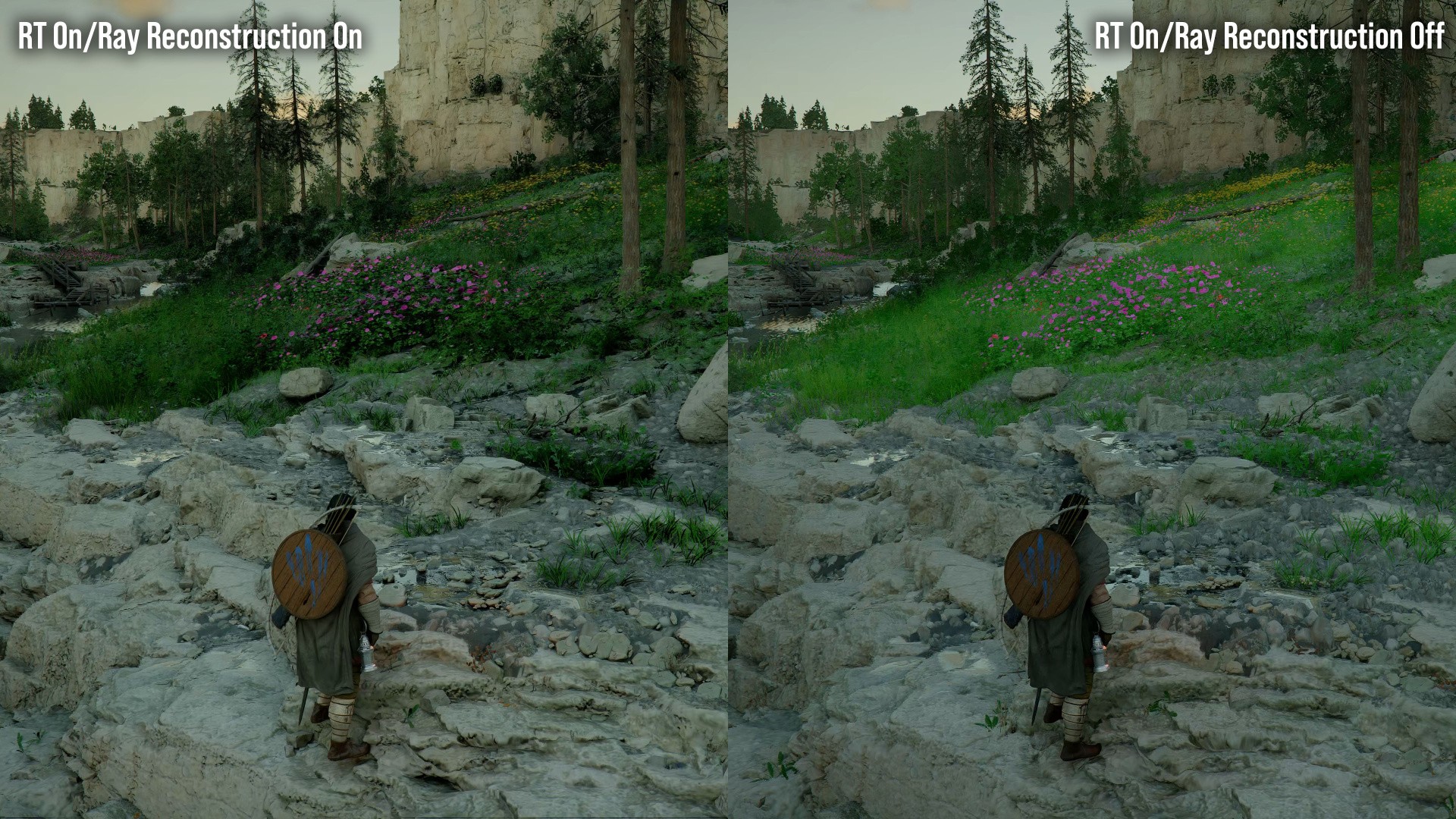
We've spent some time highlighting Crimson Desert's top-line graphics features, exemplified by the PC version of the game - and we've also looked at how that experience scales to PlayStation 5 Pro. But what we haven't shown you is what we think is the most potent visual upgrade available to PC players - and it perhaps comes from an unlikely source. The bottom line is this: while ray tracing looks impressive in this game, the visuals are transformed if users use either AMD ray regeneration or Nvidia's ray reconstruction. It turns out that in this game, RT denoising is much, much more important than you might imagine.
Crimson Desert uses ray tracing intensively for its indirect lighting across most consoles and there's a case to say that it drives the entire aesthetic of the game. However, to make this possible in a performant manner, the nature of the optimisations means that compromise is inevitable.
The game's unique surfel-based ray-traced global illumination (RTGI) can run at a mere 1/16 rays per pixel, while RT reflections operate at quarter resolution, with both using a computationally lean denoiser. This dramatic reduction in ray count is how the game manages to perform as well as it does on a range of devices - but there is a distinct cost to visual quality as a consequence.
And this is where Nvidia and AMD denoisers make a big difference. The increase in lighting quality provided here is dramatic - often looking like a toggle for RT on/off rather than just a change in denoising technology. With the standard denoiser, lighting can appear relatively flat and directionless, with geometry often lacking proper contact shadows. Meanwhile, grass can look almost unlit.
AMD's FSR Redstone ray regeneration or Nvidia DLSS ray reconstruction are game-changers. Now, tight shadows appear under pipes and overhangs, with clearly directional lighting restored to the scene, grounding objects within the environment. It's not just shadows either, with enhanced localised lighting and reflections.
It's not just about static lighting either. Both of these ML-based denoisers solve the stippled and ghostly look seen with low ray-count reflections on moving surfaces. With the standard denoiser, water reflections look as though they are running at a lower frame-rate due to ghosting from prior frames. Switching to ML denoising sorts the problems, with a more responsive and stable image. You should also see higher quality local lights from emissive sources. The impact is so profound, you're essentially getting an ultra-quality lighting setting that only PCs with ML denoising can deliver.
Of course, in swapping out a lightweight denoiser for a higher quality alternative, there is a computational cost, meaning frame-rates drop. On an RTX 5080 at 4K performance mode, enabling ray reconstruction gives a 14 percent performance drop. It's the same issue on AMD - if not more so. The RX 9070 XT sees a 24 percent frame-rate hit compared to the standard denoiser when paired with FSR 4 upscaling. Similar to other higher quality settings, users will need to carefully weigh up their settings selections to get the performance that's right for them.
It's also worth pointing out that while both AMD and Nvidia solutions are transformative, each have issues. AMD's ray regeneration doesn't seem to integrate upscaling with denoising, producing a clearly sub-native look with some content. Meanwhile, Nvidia's ray reconstruction might be cleaner, but the pre-launch build we had exhibited bugs where displacement maps had less offset, making surfaces less "craggy" than intended, while rain occasionally disappears on-screen. Pearl Abyss is aware of that problem and we'd hope to see improvement.
Beyond denoising, there are some other issues. In the build we have, there are instances of flickering shadow maps from the sun and noticeable pop-in on some elements, even on the top-end cinematic preset. Of course, this could be a factor of the pre-launch code we have, but it's definitely something to watch out for in the final game.
What's most interesting here though is that this is one of the most impactful examples we have of the importance of denoising with ray tracing. Thanks to ray reconstruction and ray regeneration, we have a high-end lighting option that is so transformative, it's hard to go back from once you've seen it. And perhaps highlights how important ML will be in the games of tomorrow.


Comments 9
Every single time I've seen footage of this game during the day, I've thought it looked hideous. Grass is all the exact same hue, just one big bright green radioactive mass. All wood looks the same brown, from planks to barrels to whatever, and all stone looks the same light grey (from roads to walls to buildings built with it). Turns out the standard denoiser was the problem all along.
I find it hard to believe that the ML denoiser can transform the scene like that compared to basic denoiser. There are clearly more rays shot out for more bounces, objects and materials.
There's surely more to this than just a different de-noising method. It looks like it's been arted up completely differently in some scenes. Would be worth speaking to the devs again, see what's really going on.
is there a chance that PSSR2 does deliver an improved de-noising as well? Not in the quality we see here but somewhere between the 2 shots seen above?
I think the ray construction just highlights how lacklustre the game's standard denoiser is.
I get that this is a low-cost feature to allow the game to scale across consoles and low-end GPUs but why is there no higher quality denoiser for medium and high options between the standard "low" setting and the "ultra" ray construction option?
For example, the game engine's denoiser by default uses 1/16 rays per pixel so why not 1/8, 1/4, 1/2 and even 1 rays per pixel options on PC? These would still fall below the quality offered by ray reconstruction but surely would be less intensive to use for those us for not running RTX 4090/5090s? These would also bridge the gap between the low quality denoiser with its issues and ray reconstruction.
More choise is always better, right, especially on PC?
Are going to do an article on the disaster PC crashing situation, or just pretend it isn't happening?
I've been trying this both on a 5070 12gb and on geforce now with the 5080 and there is a nasty shimmering around text on the hud on both with Ray Reconstruction on or off, and the grass and foliage looks bad with any sort of camera rotation at speed too, not sure if it is worse at 3440x1440 on an ultrawide so going to have to do more tinkering but either way its not drawing me in
@Langers I'm in a similar HW boat (5070 TI + ultrwawiide) and considering buying the game soon, let me know if you find some good settings.
@AndreasWright Its certainly playable but I'm holding fire waiting for a patch to improve it at the moment as the shimmering and blurring on fast movement is annoying me, it is definitely more apparent on UW than standard
Show Comments
Leave A Comment
Hold on there, you need to login to post a comment...